
 Log in

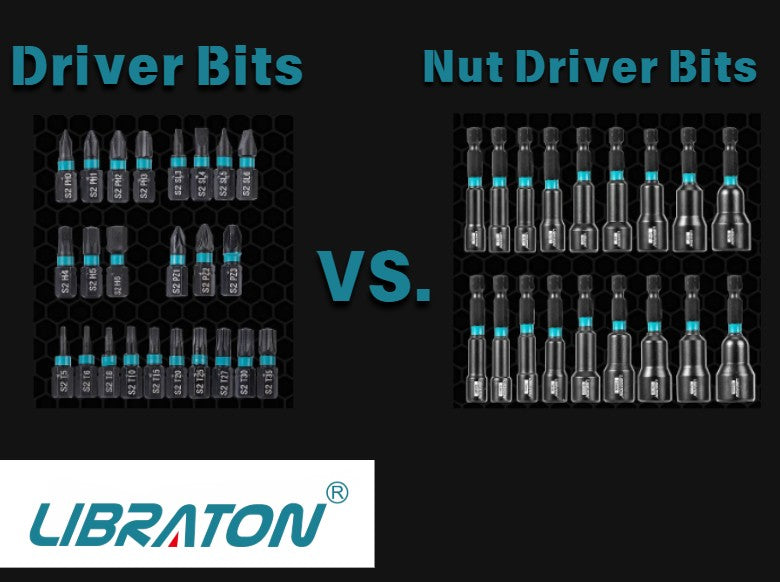
Not every bit that fits into a drill is designed to do the same job. Drill bits, driver bits, and nut driver bits may look similar at first glance, but each has a different working end and is intended for a different type of fastening or drilling task.
Understanding these differences makes it easier to choose the right accessory for the job. It can also help prevent using a bit for an application it was not designed to handle.
When comparing drill bit types, the easiest place to start is with their purpose: drill bits make holes, driver bits turn screws, and nut driver bits engage nuts and hex-head fasteners.
- What Is a Drill Bit?
- What Is a Driver Bit?
- What Is a Nut Driver Bit?
- Drill Bits vs. Driver Bits vs. Nut Driver Bits
- Why Can't You Use a Drill Bit to Drive a Screw?
- Can a Driver Bit Replace a Nut Driver Bit?
- How Do Nut Driver Bits Work With a Drill?
- How Do You Choose the Right Bit?
- Building a Versatile Drill Accessory Kit
- Tips for Using Different Bits With a Drill
- Final Thoughts
What Is a Drill Bit?
A drill bit is designed primarily for making holes in a material. Its cutting end is shaped to remove material as the bit rotates.
Different materials require different drill bit designs. A bit intended for wood, for example, may have a different cutting geometry from one intended for metal or another material.
Drill bits are commonly used with drills and other compatible rotary tools. The bit is held by the tool's chuck or another compatible interface and rotates as the tool operates.
The important thing to remember is that drill bits are cutting accessories. Their job is to create or enlarge holes, not to tighten or remove screws.
When Should You Use a Drill Bit?
Use a drill bit when the task involves creating a hole or preparing a material for another fastening operation.
Common examples include:
- Creating pilot holes before installing screws
- Drilling holes through suitable wood or other materials
- Preparing a hole for a fastener
- Enlarging an existing hole when the appropriate bit and technique are used
The correct drill bit depends on the material, hole size, and application.
What Is a Driver Bit?
A driver bit is designed to engage the head of a compatible screw or fastener so that a drill or other compatible power tool can rotate it.
Unlike a drill bit, a driver bit does not primarily cut a hole. Instead, its working end fits into the corresponding recess or drive profile on the fastener.
Common driver bit profiles include Phillips, slotted, Torx, and other designs. The correct bit needs to match the fastener head.
For example, using a Phillips driver bit with a Phillips-head screw provides the appropriate interface for driving that screw. A mismatched bit can make the job more difficult and may increase the chance of damaging the fastener.
When Should You Use a Driver Bit?
Driver bits are useful when you need to install or remove compatible screws using a drill or other suitable power tool.
They are commonly used for tasks such as:
- Furniture assembly
- Installing screws into suitable materials
- Removing compatible screws
- General maintenance and repair
- Construction and workshop tasks where the fastener and tool are appropriate
The important consideration is not simply whether the bit fits into the drill. The bit must also match the fastener.
What Is a Nut Driver Bit?
A nut driver bit is designed to engage the outside of a compatible hex-shaped fastener, such as a hex-head screw or nut.
Instead of fitting into a recess in the top of a screw, the nut driver surrounds the fastener's external hex shape.
This makes nut driver bits particularly useful when working with hex-head fasteners that are not intended to be driven with a conventional screwdriver bit.
Nut driver bits are available in different sizes, so the working end needs to match the fastener. A loose-fitting nut driver can make fastening more difficult, while the wrong size may not engage the fastener correctly.

Drill Bits vs. Driver Bits vs. Nut Driver Bits
The easiest way to understand the difference between these drill bit types is to look at what each one contacts.
| Accessory | Main purpose | Working end engages |
| Drill bit | Creating holes | Material being drilled |
| Driver bit | Driving screws | Recess or profile in a screw head |
| Nut driver bit | Driving hex fasteners | External hex shape of a nut or hex-head fastener |
Although all three can be used with compatible power tools, their jobs are fundamentally different.
A drill bit cuts into material. A driver bit transfers rotation into a screw head. A nut driver bit transfers rotation to the outside of a hex-shaped fastener.
Why Can't You Use a Drill Bit to Drive a Screw?
A drill bit and a driver bit are designed around completely different tasks.
The cutting end of a drill bit is intended to remove material. It is not shaped to properly engage a screw head.
Trying to use the wrong accessory can result in poor engagement, damage to the accessory, or damage to the fastener. Instead, select a driver bit that matches the screw's drive profile.
This distinction becomes especially useful when putting together a tool kit. You may need several drill bit types for making holes, while a separate selection of driver bits handles screw installation and removal.
Can a Driver Bit Replace a Nut Driver Bit?
Not usually. The two accessories engage fasteners differently.
A standard driver bit fits into a compatible recess or drive profile, such as a Phillips or Torx screw head. A nut driver bit is shaped to fit around an external hex fastener.
If the fastener has an external hex head, a properly sized nut driver is designed for that type of connection. If the fastener has a recessed drive profile, use the corresponding driver bit.
The right choice therefore depends primarily on the fastener rather than the drill itself.
How Do Nut Driver Bits Work With a Drill?
Nut driver bits can be installed into a compatible drill or power tool in much the same way as other bits with a compatible shank.
Once installed, the drill rotates the nut driver bit. The working end engages the appropriate hex fastener, allowing the user to install or remove it.
Before operating the tool, make sure the nut driver is properly seated and that its size matches the fastener. Start at a controlled speed and keep the tool aligned with the fastener.
For applications requiring a specific torque value, use a suitable torque-controlled tool rather than assuming that a particular bit size or drill setting provides an exact torque value.
How Do You Choose the Right Bit?
Choosing among different drill bit types becomes much easier if you identify the task first.
Need to make a hole? Start with the appropriate drill bit for the material and required hole.
Need to drive a screw? Choose a driver bit that matches the screw's drive profile.
Need to drive a hex fastener? Choose a nut driver bit that matches the fastener's external hex size.
This simple approach can prevent a lot of trial and error.
It is also worth checking the tool and accessory specifications before use. The fact that a bit physically fits into a drill does not automatically mean that it is appropriate for every application.
Building a Versatile Drill Accessory Kit
A versatile drill setup does not necessarily require one accessory that does everything. Instead, having different accessories for different tasks can make the tool more useful.
A selection might include drill bits for hole-making, driver bits for different screw profiles, and nut driver bits for compatible hex fasteners.
The LIBRATON 54-Piece Nut Driver Set, for example, combines magnetic nut drivers with screwdriver bits, socket adapters, quick-release extension holders, and wing nut drivers. This type of combination can give users several fastening options while keeping different accessories together in one kit.
The appropriate accessory should still be selected based on the fastener, tool interface, and application.
Tips for Using Different Bits With a Drill
Before inserting any accessory, check that its shank is compatible with your drill or power tool. After installation, make sure the accessory is properly seated.
For drill bits, use the appropriate bit and operating technique for the material. For driver and nut driver bits, maintain alignment with the fastener and begin at a controlled speed.
Avoid forcing a damaged, seized, or incorrectly sized fastener with a powered tool. If a specific torque value is required, use a tool designed to control and measure that torque.
It is also useful to inspect bits periodically. A worn or damaged working end may not engage the fastener properly and can make otherwise simple tasks more difficult.


Final Thoughts
The main difference between these drill bit types comes down to what they are designed to do.
Drill bits are cutting accessories used to create holes. Driver bits engage recessed screw heads, while nut driver bits engage the external hex shape of compatible nuts and hex-head fasteners.
Once you identify the fastener or material you're working with, choosing the appropriate accessory becomes much simpler. Instead of looking for one bit that can handle every task, match the accessory to the job.
With the right combination of drill bits, driver bits, and nut driver bits, a compatible drill can become a useful tool for a wide variety of drilling, fastening, assembly, and maintenance tasks.