
 Oscillating Multi-Tool Blades
 Reciprocating Saw Blades
 Cutting & Grinding
 Hole Saw
 Drilling
 Sanding & Polishing
 Socket & Driver Set
 Hand Tools
 Metal Worker & Fabrication
 Woodworking & Carpentry
 Electrical & Plumbing
 Automotive
 Concrete & Masonry
 Demolition
 NEW ARRIVALS

Anyone who has worked on electrical panels, automotive repairs, HVAC systems, furniture assembly, or machinery knows the value of a long nut driver set. The added reach allows you to access fasteners buried deep inside equipment where standard drivers simply cannot reach.
However, that extra reach comes with one common challenge: wobble.
When a driver bit flexes or moves off center, it becomes harder to keep the driver properly aligned with the fastener. This can make fastening more difficult and may increase the chance of slipping or damaging the fastener.
- 1. Why Does Wobble Happen with Long Nut Driver Bits?
- 2. Start with a High Quality Long Nut Driver Set
- 3. Always Use the Correct Driver Size
- 4. Keep the Driver Perfectly Straight
- 5. Let the Magnet Do Its Job
- 6. Apply Steady Pressure Instead of Sudden Force
- 7. Reduce Driver Speed When Using Power Tools
- 8. Support the Shaft During Deep Reach Jobs
- 9. Inspect Fasteners Before Installation
- 10. Keep Your Nut Drivers Clean
- 11. Choose Longer Reach Only When Necessary
- 12. Why the Libraton 31 Pcs Long Nut Driver Set Stands Out
- 13. Common Mistakes That Increase Wobble
- 14. Final Thoughts
Why Does Wobble Happen with Long Nut Driver Bits?
A long nut driver set naturally experiences more movement than shorter drivers because of basic physics. The longer the shaft, the greater the chance for slight flex under load.
Several factors contribute to wobble:
- Applying uneven pressure
- Using worn or damaged fasteners
- Poor socket-to-fastener fit
- Using a poorly fitting driver
- Excessive driving speed
- Bent driver shafts
- Misalignment before applying torque
While some movement is unavoidable with any extra-long driver, excessive wobble usually indicates either improper technique or poor tool quality.
Start with a High Quality Long Nut Driver Set

One of the best ways to reduce wobble is to start with the correct driver size and make sure it fits the fastener properly.
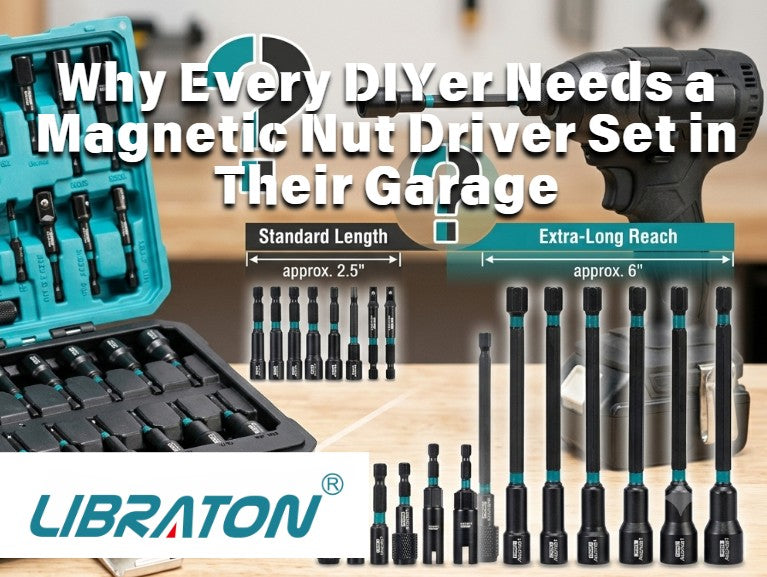
The Libraton 31 Pcs long nut driver set includes carefully machined drivers that fit hex fasteners securely. A properly sized driver should fit securely over the fastener. Choosing the correct size and making sure the driver is fully seated can help reduce unwanted movement.
A properly sized driver should fit securely over the fastener. Choosing the correct size and making sure the driver is fully seated can help reduce unwanted movement. A well-fitting long nut driver set can make fastening feel smoother and easier to control.
The Libraton 31-piece kit includes:
- SAE and Metric sizes
- Extra-long shafts for deep access
- Magnetic nut drivers
- Durable construction for professional use
- Organized storage case for quick size selection
Because every size has its own dedicated driver, you're less likely to compromise by using an imperfect fit that increases wobble.
Always Use the Correct Driver Size
One of the biggest causes of wobble has nothing to do with the tool itself.
Using the wrong size driver creates clearance between the socket and the fastener.
Even a tiny amount of play becomes exaggerated when you're using a long nut driver set, especially when reaching several inches into equipment.
Before driving:
- Confirm the fastener size.
- Use the matching SAE or Metric driver.
- Make sure the driver seats completely over the hex head.
A proper fit dramatically reduces side-to-side movement.
Keep the Driver Perfectly Straight
Alignment matters more with long drivers than short ones.
If the shaft begins at even a slight angle, the tip naturally wants to walk off center as torque increases.
When using a long nut driver set, try to:
- Position yourself directly behind the fastener.
- Keep your wrist straight.
- Let your forearm stay in line with the driver.
- Avoid twisting sideways while applying pressure.
Maintaining a straight driving line minimizes flex throughout the shaft.
Let the Magnet Do Its Job
One advantage of the Libraton long nut driver set is its magnetic design. The built-in magnet helps hold nuts in place, which can be especially convenient when you're working overhead or in a confined space. It can also make it easier to position and remove small fasteners without worrying about dropping them. This is especially useful when working overhead or inside confined spaces.
Apply Steady Pressure Instead of Sudden Force
Many users accidentally create wobble by trying to drive too aggressively.
Fast, jerky movements make the long shaft oscillate slightly.
Instead:
- Seat the driver fully.
- Apply gentle forward pressure.
- Increase torque gradually.
- Maintain consistent speed.
Smooth inputs allow the long nut driver set to remain centered throughout the fastening process.

Reduce Driver Speed When Using Power Tools
If you're using your long nut driver set with an impact driver or drill, speed becomes extremely important.
Higher RPM creates greater vibration, especially on longer shafts.
Whenever possible:
- Start slowly.
- Allow the driver to center itself.
- Increase speed only after engagement.
- Finish tightening at lower speed.
Many professionals intentionally reduce drill speed when using extended nut drivers because it noticeably improves control.
Support the Shaft During Deep Reach Jobs
When working several inches inside cabinets or machinery, supporting the shaft can dramatically reduce flex.
If space allows:
- Use your free hand to stabilize the shaft.
- Brace your wrist against nearby surfaces.
- Rest your forearm whenever possible.
Supporting the driver decreases vibration and makes a long nut driver set feel much more rigid during operation.
Inspect Fasteners Before Installation
Sometimes the problem isn't the driver.
Damaged fasteners often create the illusion of tool wobble.
Check for:
- Rounded corners
- Rust buildup
- Paint accumulation
- Deformed hex heads
- Manufacturing defects
Even a properly sized nut driver may have trouble engaging securely if the fastener itself is damaged.
Replacing questionable hardware often solves the issue immediately.

Keep Your Nut Drivers Clean
Debris inside the socket prevents full engagement.
Even a small amount of dirt, grease, or metal shavings can keep the driver from seating completely.
Periodically:
- Wipe the socket clean.
- Remove metal chips.
- Inspect the magnet.
- Check for wear.
A clean long nut driver set delivers noticeably better grip than one filled with debris.
Choose Longer Reach Only When Necessary
Longer isn't always better.
While a long nut driver set excels at accessing recessed fasteners, unnecessary length introduces additional leverage that can increase flex.
Whenever possible:
- Use the shortest driver that reaches the fastener.
- Reserve the longest drivers for deep applications.
Fortunately, the Libraton 31 Pcs set offers multiple sizes, allowing you to choose the most appropriate driver for each task instead of relying on a single oversized tool.
Why the Libraton 31 Pcs Long Nut Driver Set Stands Out
A quality long nut driver set should do more than simply reach farther.
It should help you work more efficiently and with better control.
The Libraton 31 Pcs Long Nut Driver Set is a practical option for DIY projects, home repairs, maintenance tasks, workshop work, and light professional applications.
Key benefits include:
- Comprehensive 31-piece collection for SAE and Metric applications
- Long-reach design for difficult-to-access fasteners
- Magnetic tips that improve fastener retention
- Multiple driver sizes for a range of hex fasteners
- Durable construction for long-term reliability
- Clearly organized storage case for efficient workflow
Whether you're installing electrical hardware, repairing vehicles, servicing HVAC equipment, assembling furniture, or maintaining machinery, this long nut driver set provides the versatility needed for a wide variety of fastening tasks.
Instead of purchasing individual drivers over time, you get a complete collection that covers most common hex fastener sizes in one organized kit.
Common Mistakes That Increase Wobble
Even experienced users occasionally develop habits that make wobble worse.
Avoid these common mistakes:
- Using the wrong driver size
- Starting at an angle
- Applying excessive speed
- Using damaged fasteners
- Driving with uneven pressure
- Ignoring worn driver tips
- Allowing dirt to build up inside the socket
- Forcing the tool when resistance increases


Correcting just one or two of these habits can noticeably improve the performance of your long nut driver set.
Final Thoughts
A small amount of movement is normal whenever you're working with extended-reach tools, but excessive wobble should never be accepted as unavoidable.
Many stability issues can be reduced by combining proper technique with the right driver size and a well-fitting long nut driver set. Using the correct driver size, maintaining straight alignment, applying smooth pressure, and keeping your tools clean all contribute to smoother, more controlled fastening.


Leave a comment
This site is protected by hCaptcha and the hCaptcha Privacy Policy and Terms of Service apply.